All Games

Goat Simulator 3 System Requirements

November 17, 2022Coffee Stain Studios

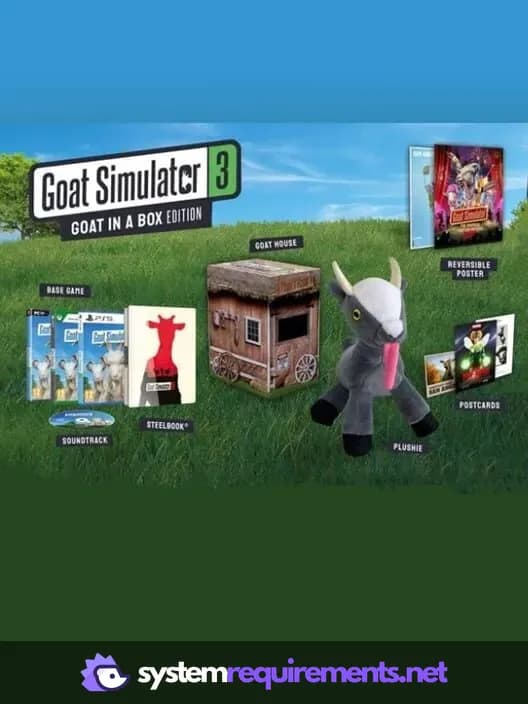
Assume the role of a goat in Goat Simulator 3, a third-person sandbox title set on the sprawling island of San Angora. Explore new locations, challenges, and events using goat-like abilities such as headbutting and licking. The Goat in a Box Edition includes physical collectibles, in-game items, and 3D printing files for PC users.

Goat Simulator 3 Minimum & Recommended Specs

Minimum: Intel Core i5-8400, Nvidia GeForce GTX, 8 GB RAM. Recommended: 16 GB RAM RAM.

Minimum System Requirements

OS
Windows 10
Processor
Intel Core i5-8400 / AMD Ryzen 5 1600CPU Deals
RAM
8 GB RAMRAM Deals
Graphics Card
Nvidia GeForce GTX 1050 Ti / AMD Radeon RX 580GPU Deals
DirectX
Version 12
Storage
25 GB available spaceSSD Deals

Recommended System Requirements

OS
Windows 10
Processor
Intel Core i5-11600K / AMD Ryzen 5 3600CPU Deals
RAM
16 GB RAMRAM Deals
Graphics Card
Nvidia GeForce RTX 2070 / AMD Radeon RX 5700 XTGPU Deals
DirectX
Version 12
Storage
25 GB available spaceSSD Deals

Trailer

Quick Performance Tips for Goat Simulator 3

#1

Lower shadow quality for a significant performance boost.

#2

Reduce draw distance to improve framerate.

#3

Close unnecessary background applications.

#4

Update your graphics drivers for optimal performance.

Goat Simulator 3 System Requirements FAQ

Can I run Goat Simulator 3 on a low-end PC?
To play Goat Simulator 3, your PC must meet at least the minimum requirements: Intel Core i5-8400 / AMD Ryzen 5 1600, Nvidia GeForce GTX 1050 Ti / AMD Radeon RX 580, and 8 GB of RAM. If your PC is below these specs, you may experience performance issues or be unable to run the game.
What GPU do I need for Goat Simulator 3?
The minimum GPU required is an Nvidia GeForce GTX 1050 Ti or an AMD Radeon RX 580. For the best experience, the developers recommend an Nvidia GeForce RTX 2070 or an AMD Radeon RX 5700 XT.
How much RAM does Goat Simulator 3 need?
Goat Simulator 3 requires a minimum of 8 GB of RAM. For optimal performance and smoother gameplay, 16 GB of RAM is recommended.
Will Goat Simulator 3 run on integrated graphics?
While it *might* technically launch, Goat Simulator 3 is unlikely to run well on integrated graphics. A dedicated graphics card is highly recommended to achieve playable framerates and a good experience. The minimum requirements specify dedicated GPUs.
What is the best graphics settings for Goat Simulator 3?
The best graphics settings depend on your hardware. If you meet the recommended specs, try 'High' or 'Ultra.' If you meet the minimum specs, start with 'Low' or 'Medium' and adjust upwards until you find a balance between visual quality and performance. Experiment with individual settings like shadow quality and draw distance.
Goat Simulator 3 PC game cover art

Goat Simulator 3 Game Info

Developer

Coffee Stain Studios

Publisher

Coffee Stain Publishing

Release Date

November 17, 2022

Platforms

Xbox Series X|S, PC (Microsoft Windows), PlayStation 5

Genres

SimulatorAdventure

Game Modes

  • Single player
  • Multiplayer
  • Co-operative

Goat Simulator 3 Screenshots

Goat Simulator 3 gameplay screenshot 1
Goat Simulator 3 gameplay screenshot 2
Goat Simulator 3 gameplay screenshot 3
Goat Simulator 3 gameplay screenshot 4
Goat Simulator 3 System Requirements - Can Your PC Run It?