Dual Channel DDR4-3200 on Mainstream Desktop
Suppose you have a Ryzen 5 5600X with two 8GB DDR4-3200 sticks in dual channel. MT/s = 3200, bus width = 64 bits (8 bytes), channels = 2. Calculation: (3200 × 8 × 2) / 8 / 10^3 = 51.2 GB/s.

FREE MEMORY BANDWIDTH CALCULATOR
Need to know your RAM's maximum theoretical bandwidth? This memory bandwidth calculator estimates data transfer rates based on your memory’s speed, channel count, and bus width. Instantly see how much data your DDR4 or DDR5 setup can move per second, ideal for troubleshooting or planning upgrades.
Theoretical peak bandwidth
This memory bandwidth calculator measures the peak data transfer rate your RAM can achieve, given its speed, channel configuration, and bus width. It outputs the maximum theoretical bandwidth in gigabytes per second (GB/s), letting you compare memory kits or check if your configuration is delivering expected performance. This is useful for enthusiasts, builders, and anyone benchmarking a PC or server. The calculator focuses on theoretical maximums, not real-world throughput. Actual performance may be lower due to latency, software efficiency, or CPU memory controller limitations.
Start by entering your memory's effective data rate in MT/s (Mega Transfers per second). You can find this in your RAM specs, like DDR4-3200 or DDR5-5600. Next, set the module bus width - most consumer DIMMs use 64 bits per channel. Finally, enter the number of memory channels your CPU and motherboard support. Mainstream desktop platforms (such as Intel Core i7-13700K or AMD Ryzen 7 7800X3D) use dual channel, while some workstations and servers offer quad or even eight-channel support. Click calculate to see your memory subsystem’s maximum bandwidth in GB/s. This value lets you compare against manufacturer claims or gauge if your system is performing as expected.
The calculator uses the following formula to estimate theoretical memory bandwidth:
GB/s = (MT/s × bus width × channels) / 8 / 10^9
Where:
This formula gives the peak transfer rate under ideal conditions. Real-world performance will be lower due to factors like memory latency, CPU memory controller efficiency, and system workload. Some motherboards may not enable all channels by default, or memory may run at reduced speed with certain DIMM configurations.
The value shown, measured in GB/s, represents the fastest possible data throughput your RAM could achieve. For example, a result of 51.2 GB/s means the memory can theoretically move 51.2 gigabytes of data each second between RAM and the CPU. This is a best-case scenario and does not account for real-world inefficiencies or overhead.
Why it matters: Memory bandwidth becomes a bottleneck in bandwidth-heavy workloads like scientific computing, 3D rendering, video editing, and gaming with high-end GPUs like the RTX 4090. If your RAM bandwidth is too low, the CPU or GPU may spend time waiting for data, reducing overall system performance.
For most gaming and everyday tasks, dual channel DDR4 or DDR5 is sufficient. High-end workstations or servers, especially those running multiple memory-intensive applications, benefit from higher channel counts and faster memory. Use this calculator to check if your system's configuration matches published specs, or to plan an upgrade for specific workloads.
Suppose you have a Ryzen 5 5600X with two 8GB DDR4-3200 sticks in dual channel. MT/s = 3200, bus width = 64 bits (8 bytes), channels = 2. Calculation: (3200 × 8 × 2) / 8 / 10^3 = 51.2 GB/s.
An older laptop with one 8GB DDR4-2666 module. MT/s = 2666, bus width = 64 bits (8 bytes), channels = 1. Calculation: (2666 × 8 × 1) / 8 / 10^3 = 21.3 GB/s.
A workstation with an Intel Xeon W-2295 and four DDR4-3200 modules in quad channel. MT/s = 3200, bus width = 8 bytes, channels = 4. Calculation: (3200 × 8 × 4) / 8 / 10^3 = 102.4 GB/s.
A high-end gaming PC using a Core i7-13700K and two DDR5-6000 modules. MT/s = 6000, bus width = 8 bytes, channels = 2. Calculation: (6000 × 8 × 2) / 8 / 10^3 = 96.0 GB/s.
A server with an AMD EPYC CPU and eight DDR4-2933 channels. MT/s = 2933, bus width = 8 bytes, channels = 8. Calculation: (2933 × 8 × 8) / 8 / 10^3 = 187.7 GB/s.
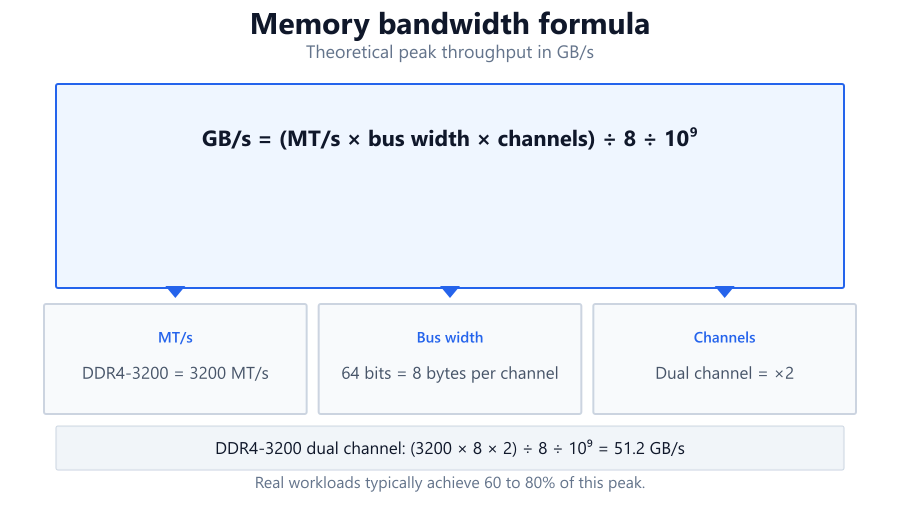
A Ryzen 7 5700G APU with dual channel DDR4-3200. Integrated GPUs depend heavily on RAM bandwidth. Calculation: (3200 × 8 × 2) / 8 / 10^3 = 51.2 GB/s.
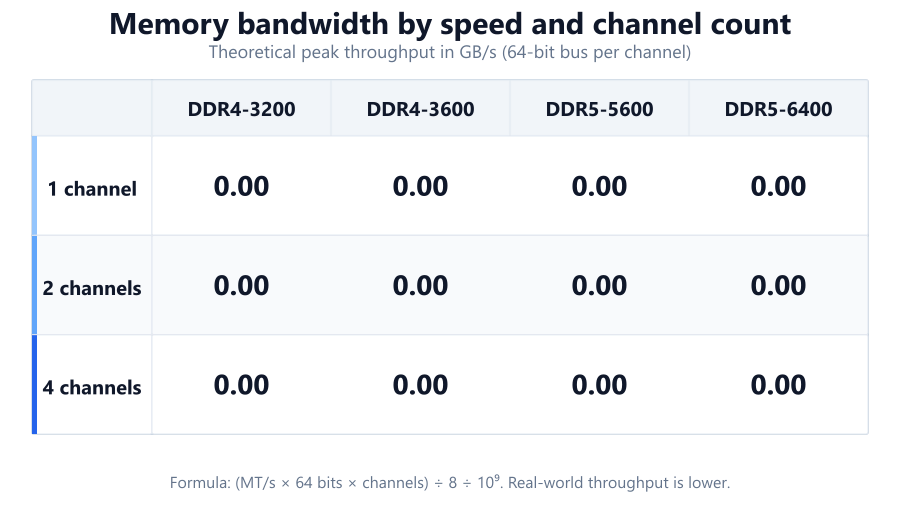
Gamers use this memory bandwidth calculator to check if their RAM is bottlenecking performance, especially with integrated graphics or high-end GPUs. For example, pairing an RTX 4070 with slow, single channel DDR4 can restrict frame rates in some games.
Professionals building workstations or servers (e.g., for Blender, Adobe Premiere, or scientific simulation) use the calculator to select the right memory type and channel count. Applications with large datasets or high concurrency benefit from maximizing bandwidth.
If your system feels slower than expected, comparing your measured memory bandwidth to the calculated maximum can reveal configuration issues, like a DIMM not running in dual channel or memory running at JEDEC default speeds.
APUs like AMD's Ryzen G series or Intel Iris Xe rely on system RAM for graphics memory. Higher bandwidth improves 3D and video performance.
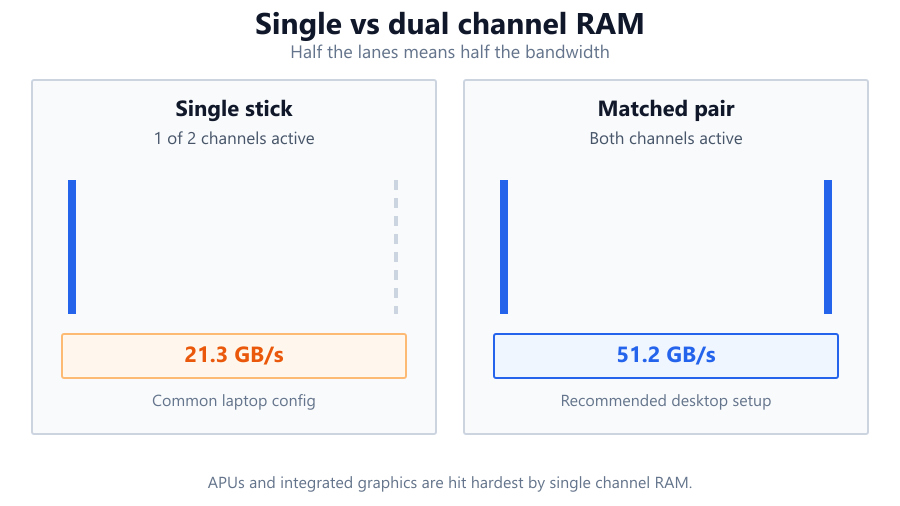
The values from this memory bandwidth calculator are ideal and may not reflect real-world sustained bandwidth. Expect practical results to be 60-80% of the theoretical rate, depending on workload and system configuration.
Make sure RAM is installed in the correct slots to enable dual, quad, or higher channel operation. Mismatched modules or using only one stick can halve available bandwidth.
RAM may default to lower speeds unless XMP or DOCP profiles are enabled in BIOS. Always verify your memory is running at the intended MT/s.
Some CPUs and motherboards limit maximum memory frequency or channel count. Refer to your hardware's specifications to confirm support.
Server memory (ECC, RDIMM) may have different bus widths or additional overhead. Adjust settings in the calculator accordingly.
Low latency can be as important as high bandwidth for some workloads, especially gaming. Consider both when evaluating memory performance.
This memory bandwidth calculator quickly estimates the theoretical peak RAM bandwidth of your system, letting you benchmark, troubleshoot, or plan upgrades with confidence. Enter your memory speed, bus width, and channel count for an instant answer in GB/s. Use the result to compare against manufacturer specs, detect misconfigurations, or balance your build for gaming, content creation, or server workloads.
Remember, the calculator shows theoretical maximums. Real-world results will be lower due to latency and platform limitations. For best performance, match RAM speed and channels to your CPU and workload needs, and double-check your BIOS settings to ensure your memory is running at full speed.
To calculate memory bandwidth, multiply your RAM's data rate in MT/s by the bus width (usually 8 bytes per channel), then by the number of memory channels. Divide the result by 8 to convert bits to bytes, and then by 1,000,000,000 to get GB/s. For example, DDR4-3200 in dual channel: (3200 × 8 × 2) / 8 / 1,000,000,000 = 51.2 GB/s theoretical bandwidth.
Dual channel doubles the available bandwidth compared to single channel because data can be transferred on two parallel memory channels. For instance, single channel DDR4-3200 provides 25.6 GB/s, while dual channel offers 51.2 GB/s. This difference can impact gaming, integrated graphics, and memory-intensive workloads.
Theoretical bandwidth is calculated under ideal conditions. Real applications encounter latency, memory controller overhead, and less efficient access patterns. Expect real-world bandwidth (measured with tools like AIDA64 or SiSoftware Sandra) to reach 60-80% of the maximum, depending on workload and system configuration.
Faster RAM increases bandwidth, but the impact on performance depends on your workload. Bandwidth-sensitive tasks like video editing, 3D rendering, and integrated graphics benefit more than typical gaming or office work. Low latency can be just as important for gaming, so balance speed with timing specifications.
Check your motherboard manual for the correct DIMM slot population. Most boards alternate slots for dual channel. Software like CPU-Z can confirm the channel configuration under the 'Memory' tab. If it shows 'Dual', both channels are active. If it shows 'Single', double-check your installation.
Yes, but make sure to adjust the bus width and channel counts according to your server platform. Some ECC or registered DIMMs use non-standard bus widths, and server CPUs may offer more than four channels. Always refer to your server motherboard and CPU documentation for accurate figures.
With discrete GPUs like the RTX 4070, most games aren't heavily limited by RAM bandwidth unless you use very slow memory or single channel. However, some open-world or simulation games can see a few percent improvement from faster or dual channel RAM, especially at lower resolutions or with integrated graphics.
DDR5 provides higher frequencies and, in turn, higher theoretical bandwidth per module compared to DDR4. For example, DDR5-6000 in dual channel can reach 96 GB/s, while DDR4-3200 in dual channel maxes out at 51.2 GB/s. DDR5 also supports greater memory density and improved efficiency features.
Use benchmarking tools like AIDA64 (Windows) or SiSoftware Sandra to measure actual memory bandwidth. On Linux, 'mbw' or 'sysbench' can also estimate throughput. Compare these numbers to your theoretical value from the calculator to spot configuration issues or underperforming hardware.
Installing RAM of different sizes, speeds, or timings may force your system to run at the slowest module’s speed, and may prevent dual or quad channel operation. This can cut your available bandwidth in half or cause stability problems. For best results, use matched pairs or kits.
Yes. XMP (Intel) and DOCP (AMD) profiles set your RAM to its rated speed and timings. Without enabling these in BIOS, memory may default to lower JEDEC speeds, reducing bandwidth. Always enable XMP/DOCP to get the most out of your memory modules.
Workstations and servers benefit from more memory channels, as bandwidth scales linearly with channel count. Quad or eight-channel configurations provide much higher bandwidth for data-heavy workloads like scientific computing or virtualization. Check your CPU and motherboard specs for supported channel count.
Yes, especially with integrated graphics or in memory-bound applications. If RAM bandwidth is too low, the CPU or GPU may stall waiting for data. Discrete GPUs with their own VRAM are less affected, but integrated GPUs and some high-end CPUs (e.g., for scientific workloads) can be bandwidth-limited.
Bus width defines how much data can be transferred per clock cycle per channel. Most consumer DDR4 and DDR5 DIMMs use a 64-bit (8-byte) bus per channel. Wider buses, such as those in some server platforms, increase bandwidth proportionally, but are uncommon outside enterprise hardware.
Several factors could be at play: the new modules may be running at the same speed as before, the channel configuration may not have changed, or BIOS settings may limit frequency. Use CPU-Z or similar tools to verify speed and channels, and check that XMP/DOCP is enabled.
Both matter, but for most games, lower latency has a greater impact than raw bandwidth. High bandwidth helps integrated graphics or memory-heavy titles, but fast timings (low CAS latency) can provide smoother frame delivery. For best results, balance frequency and timings based on your CPU and motherboard support.
Free tools to analyze, compare, and optimize your PC gaming performance
Check if your PC meets the requirements for these popular games
Benchmark data from PassMark and publisher specs. Calculators run locally in your browser — we never upload your hardware info.