Formula
Download Time (seconds) = File Size (bytes) × 8 / (Download Speed in Mbps × 1,000,000 × Efficiency)

FREE DOWNLOAD TIME CALCULATOR
Need to know how long a file will take to download? This download time calculator gives you a precise estimate based on your file size and internet speed, breaking down the result into hours, minutes, and seconds.
Estimated time to complete download
Real-world note
Ideal-condition estimate. Steam, Epic, and console stores rarely sustain 100% line rate — add 10–25% buffer for patches and disk writes.
The download time calculator estimates how long it will take to download any file based on your internet connection speed. Whether you're grabbing a 100GB Steam game, a 4K movie, or data backups, you get a straightforward answer in hours, minutes, and seconds. It works for files measured in megabytes, gigabytes, or terabytes, and handles speeds from ADSL to gigabit fiber. The tool is ideal for planning large downloads and managing limited bandwidth connections. Results are instant and require no sign-up.
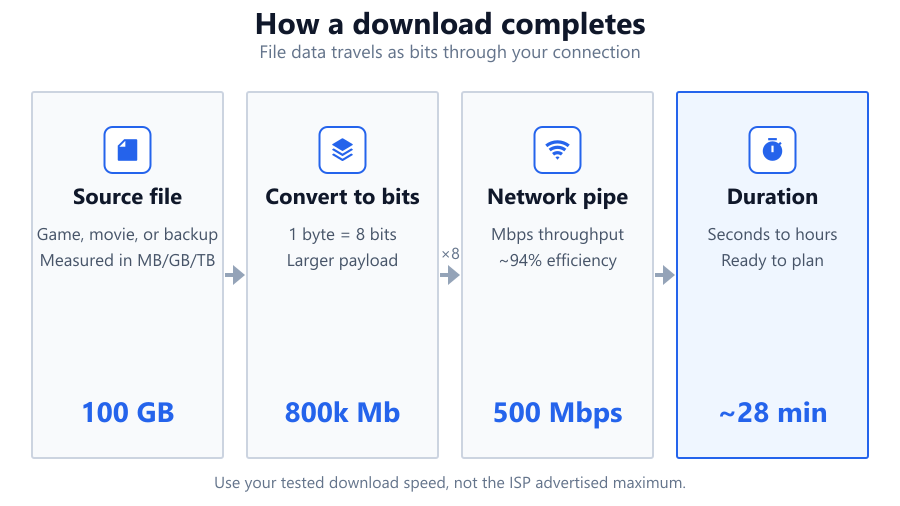
Enter your file size in MB, GB, or TB. Next, type your internet download speed in Mbps or Gbps. The calculator accepts fractional numbers - so 0.5 GB or 150.75 Mbps are valid. Click calculate, and the tool instantly displays the estimated download duration.
Choosing file size: If your download shows 45,000 MB, enter 45,000 MB. For 45 GB, type 45 in the GB field. Internet speed: Run a speed test (like Ookla or Fast.com) to get your real download speed, not the maximum your ISP advertises.
If you're unsure of your speed, estimate conservatively - real-world throughput often falls below advertised rates due to network congestion or sharing.
The calculator converts your file size to bits (1 byte = 8 bits), then divides by your connection speed in bits per second.
Download Time (seconds) = File Size (bytes) × 8 / (Download Speed in Mbps × 1,000,000 × Efficiency)
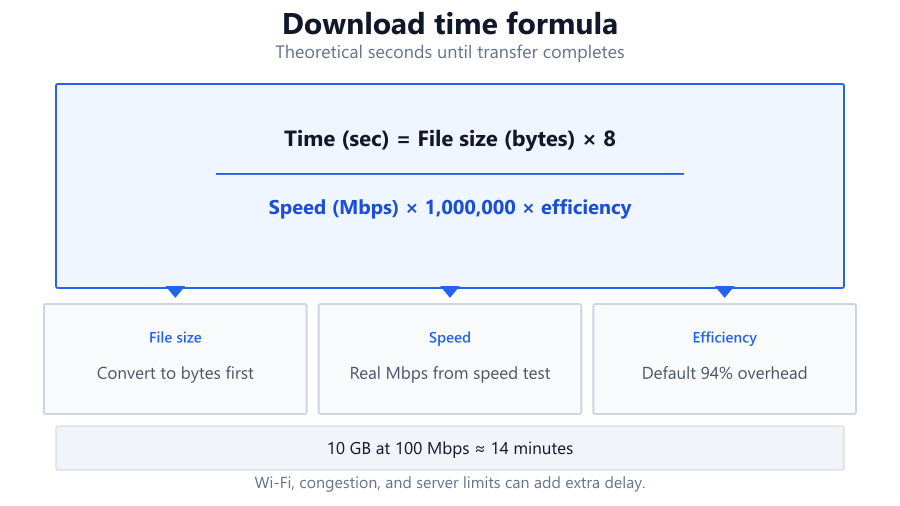
Efficiency defaults to 94% to reflect network overhead (protocols, packet loss). Real-world speeds are rarely 100% of your line rate. The result is displayed in hours, minutes, and seconds for clarity. For example, downloading a 10GB file at 100 Mbps: 10,000 MB × 8 = 80,000 Mb 80,000 Mb / (100 Mbps × 0.94) = 851 seconds ≈ 14 minutes.
The download time estimate is a best-case scenario, assuming your connection remains stable and fully available for the file transfer. If you share bandwidth with others or use Wi-Fi, actual times may be longer. Large files (like AAA games or uncompressed RAW video) will show longer durations even on fast fiber. For smaller files, the difference between theoretical and real speed is less noticeable.
If your download stalls or fluctuates, consider that ISPs often throttle speeds during peak hours or for certain services. Always check if your device or network hardware (like an old Wi-Fi router) is limiting your speed.
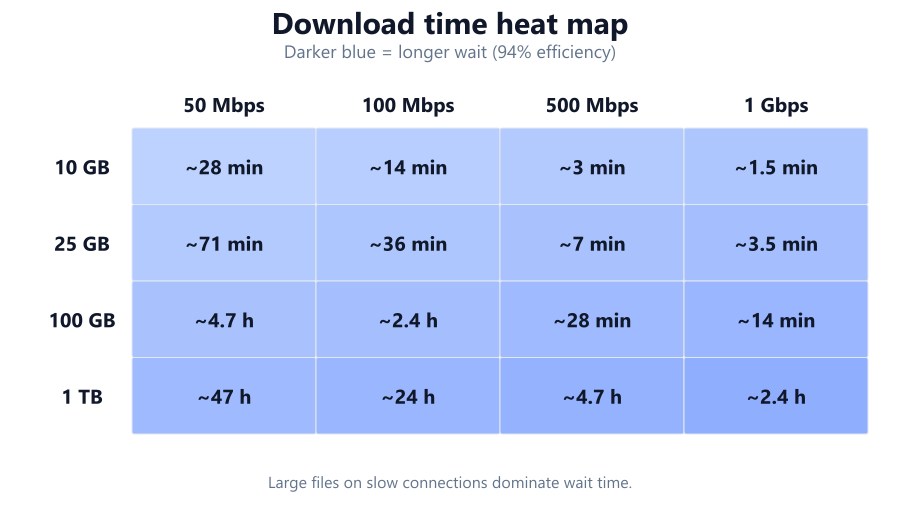
Gamers use the download time calculator to estimate how long it’ll take to install new titles like Call of Duty: Warzone or Baldur’s Gate 3, which can exceed 100GB. IT professionals and content creators rely on it for backup restores and raw footage transfers. Home users check if a big Windows update or macOS installer will finish before a meeting.
If you’re on mobile data, knowing the download time helps avoid blowing through your monthly cap. Rural users on satellite or DSL can see if a large download is practical overnight. The calculator also helps compare real-world speeds after an ISP upgrade or to troubleshoot slow downloads.
Measured download speed: Always use your tested download speed, not the number on your ISP bill. Wi-Fi often runs 20-50% slower than wired Ethernet, especially on older routers or in crowded apartments.
Network overhead: Protocols like TCP/IP, encryption, and error correction reduce usable bandwidth. The calculator assumes 94% efficiency, but real overhead varies - especially with VPNs or congested links.
Interruption risks: Pausing or losing connection resets your progress for most downloads. Cloud services may resume, but some direct downloads do not.
ISP throttling: Some providers slow large downloads or traffic from specific sites. If your results are much slower than the calculator predicts, you may be throttled.
File compression: Some downloads are compressed on the server side, making actual transfer sizes smaller than advertised.
The download time calculator gives a realistic estimate of how long it’ll take to transfer files of any size at your current internet speed. It’s accurate for home, office, and gaming use, but final times may vary due to network overhead, ISP throttling, and Wi-Fi limitations. For large downloads or upgrades, knowing the duration helps you plan bandwidth and downtime. Always test your actual speed and factor in some margin for real-world variability. Use this tool to set expectations before your next big download.
To estimate the download time for a 100GB file at 100Mbps, convert 100GB to megabytes (100,000MB), multiply by 8 for megabits (800,000Mb), then divide by your speed (100Mbps) and adjust for network efficiency (around 94%). The result is roughly 1.42 hours or about 85 minutes. Use the calculator for instant results without manual math.
Real-world download times can be longer due to network overhead, Wi-Fi interference, shared connections, ISP throttling, or server speed limits. The calculator assumes your full line speed is available and 94% efficiency for overhead, but actual conditions may reduce your effective bandwidth. Always test your download speed and consider possible slowdowns from other devices or applications.
The calculator uses precise formulas and includes a typical overhead factor, so estimates are close for most users. However, actual times can differ if your connection fluctuates, your ISP throttles certain traffic, or the server hosting the file is slow. For most home and office scenarios, expect the result to be within 10-20% of real download times.
Mbps stands for megabits per second and is how ISPs usually advertise speeds. MBps means megabytes per second. There are 8 bits in a byte, so 100Mbps equals 12.5MBps. Always check which unit is being used to avoid confusion, and enter your speed in Mbps for the calculator.
Yes, Wi-Fi can lower your download speed due to signal interference, distance from the router, or network congestion. Wired Ethernet connections typically provide more consistent speeds and lower latency. If you’re seeing much slower times than expected, try connecting via Ethernet to see if your Wi-Fi is the bottleneck.
Yes, but you need to enter your upload speed instead of download speed. Most home connections have much slower upload rates, so uploading a large file can take many times longer than downloading the same file. For example, uploading 10GB at 10Mbps will take much longer than downloading it at 100Mbps.
Large downloads might trigger ISP throttling, or your connection could be shared with other devices. Wi-Fi congestion, server limitations, or background apps can also reduce available bandwidth. Use the calculator's estimate as a baseline, but check your network for competing traffic if you notice slowdowns.
Use a reputable speed test site like Speedtest.net or Fast.com. Run the test from the device you’ll use for the download, preferably over a wired connection. Use the result labeled "Download speed" in Mbps for the most accurate calculator results. Avoid using speeds advertised by your ISP - they’re often higher than what you actually get.
Yes, the download time calculator works for any internet connection type, including mobile LTE/5G or satellite. Enter your tested download speed. Be aware that mobile and satellite links may have more variable speeds and higher latency, which can increase actual download times beyond the estimate.
Network overhead refers to the extra data needed for protocols, error correction, and packet headers during a file transfer. This reduces the effective throughput available for the actual file. The calculator includes a standard 94% efficiency to account for common overhead, but real-world overhead can be higher if you're using VPNs, encrypted transfers, or have a noisy connection.
Connect via wired Ethernet if possible, close other bandwidth-hungry applications, and download from servers close to your location. Upgrade your router if it’s outdated, and check for ISP speed upgrades. For massive downloads, schedule them during off-peak hours to avoid congestion and throttling.
Steam (and some other platforms) display download speed in MBps, not Mbps. Also, Steam may be limited by server capacity or local network issues. To compare, multiply Steam's MBps by 8 to get Mbps. If you’re downloading at 10MBps on Steam, that’s 80Mbps, which may be lower than your ISP’s advertised speed due to overhead or congestion.
A 50GB file is 50,000MB. Multiply by 8 to get 400,000 megabits. Divide by 25Mbps, then adjust for network overhead (0.94). The result is about 17,000 seconds, or roughly 4.7 hours. Use the calculator for an instant breakdown into hours, minutes, and seconds.
No, the calculator assumes the server can deliver data as fast as your connection allows. If the server is slow or has bandwidth caps, your real download time will be longer than the estimate. Always consider possible server-side bottlenecks with large or popular downloads.
Yes, add the total file sizes together and enter the sum into the calculator. For example, downloading three 4GB files is the same as a single 12GB file. If you download files simultaneously and share bandwidth, the effective speed per file will be lower, so factor that in.
Not always. Gigabit fiber is advertised as 1,000 Mbps, but due to network overhead, hardware limitations, and ISP factors, your actual download speed often lands between 850 and 950 Mbps. The calculator's efficiency setting reflects this, but always use a speed test for your true baseline.
Free tools to analyze, compare, and optimize your PC gaming performance
Check if your PC meets the requirements for these popular games
Benchmark data from PassMark and publisher specs. Calculators run locally in your browser — we never upload your hardware info.